Sometimes one pad has to serve two rooms at once. The drummer needs a click and a guide vocal in an in-ear, and the front of house needs the backing track with none of it. Two files, two destinations, one downbeat.
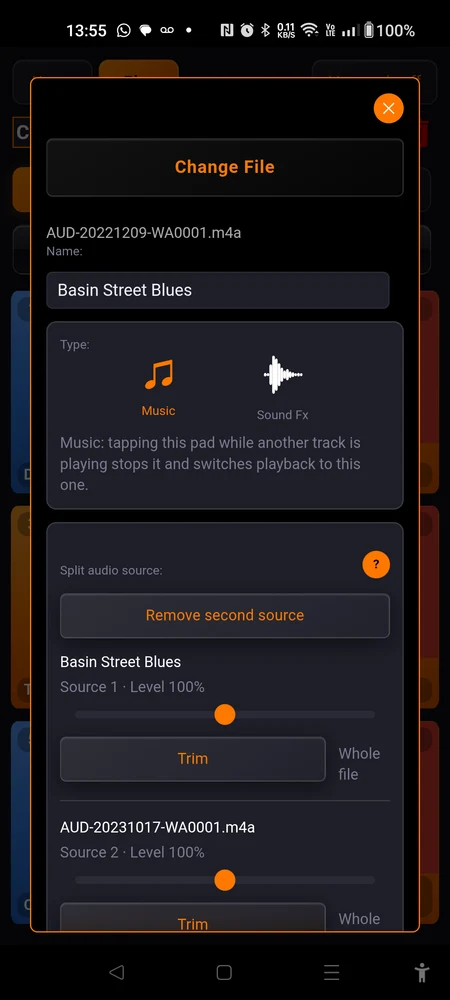
A pad can play both. “Split audio source:” turns one pad into two independent files playing together, one per ear, each with its own level, locked in sync.
This is the most involved thing in the app. It also only has to be done once per song, at home, and then it never asks anything of you again.
Why it is built this way
The two files are assembled into a single stereo mix on the phone, one source per channel. Because there is only one stream, there is nothing to keep in step: the two sources cannot drift apart and cannot flam.
Playing the two files in two players sounds like the obvious answer, and it is the wrong one. The gap between their two starts is never the same twice, tens of milliseconds of it, and there is no way to null it out. A click flamming against the band by 30 ms is unusable.
Assembling the mix takes real time, so it happens when you set the song up and never when you press play. Nothing is ever built on the play path.
How long depends on the length of the two files and on the phone. A pair of five-minute tracks takes about twenty-five seconds on a recent Android and can take a minute or more on an older one. A short cue takes a few seconds. It runs in the background and blocks nothing, but it is not instant, and that is worth knowing before you plan on doing it in the van.
While it works, the pad shows two branches flowing into one, and the mark keeps moving for as long as the build lasts. A moving mark means the phone is busy, not stuck. The pad becomes playable by itself the moment the mix is ready, with nothing to press.
Setting one up
Open a pad’s settings and tap the “Split audio source:” card, near the top of the page.
-
Tap the “Split audio source:” card. It reads “One source” until there is a second file.
-
“Import” picks the second file. Or, if the file already on the pad is a stereo bounce with one source per channel, “Split main audio” separates its left and right into two sources. That button is greyed out on a mono file, and the app tells you if the file turns out to be mono after all. If the second file has a different sample rate it is resampled, and you are told that too.
-
The mix builds in the background. You can close the window, keep editing, keep playing other pads. The pad itself shows a small symbol of two lines merging into one while it works, and stops showing it when the mix is ready. If the mix is missing or a build failed, a button appears in the window saying so, and tapping it builds again.
The pad will not play until the mix is ready. Give it the time it needs, and watch for that symbol to disappear before you count on the pad. Do this at home, not at the venue.
-
Set the two levels: “Source 1 · Level {n}%” and “Source 2 · Level {n}%”, from 0 to 200%. Both are heard as you move them, with the song playing, so you set them by ear rather than by number.
-
“Channel balance” is two sliders, one per ear. By default the left is source 1 only and the right is source 2 only. Each ear is a crossfade between the two sources, so turning one up takes room from the other. That is deliberate: a channel can never sum past its own level, so it can never distort.
-
“Trim” sits under each source, and decides which part of that file goes into the mix. It reads “Whole file” until you change it. Changing it rebuilds the mix.
-
Under “Alignment”, the button “Align” opens the visual aligner, for the case where the two files were not exported from the same point.
Exporting the two sources as one stereo file, for “Split main audio” to separate? Export a WAV. MP3 and AAC couple their two channels by design, so separating them afterwards is imperfect and one source will bleed into the other.
What costs another build
Four things send the mix back to be reassembled, so each of them costs that wait again:
- changing the main audio file
- changing either Trim
- changing the alignment offset
- restoring the set on a new phone, where the mix does not exist yet
The two levels and the channel balance cost nothing: they are applied while the song plays. So set the trims and the alignment first, and do the mixing afterwards.
The aligner
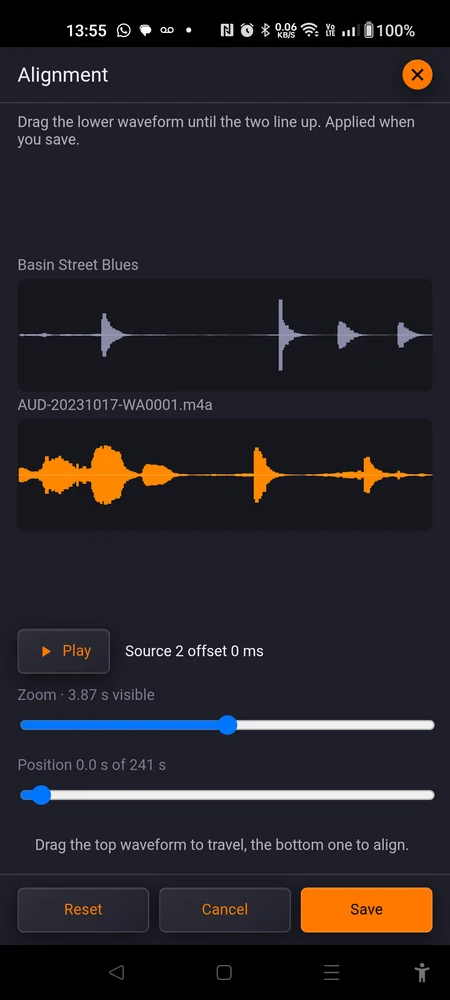
Both waveforms are drawn on one time scale, source 1 on top and source 2 below. Drag the lower one until the two line up. Source 1 never moves, so the reference you are aligning to stays put. Drag the upper one instead and you travel through the song.
A millisecond figure cannot be judged by eye. Two attacks failing to line up can be seen at a glance, which is the whole reason this screen exists.
The zoom slider tightens the view down to a fraction of a second, and reads out how much time is visible. The transport button plays the window you are looking at, as a real mix, so what you hear is what the song will sound like. Beside it the offset reads out as “Source 2 offset {n} ms”, and can go 5000 ms either way.
“Save” applies it and rebuilds the mix. “Reset” puts the offset back to zero, “Cancel” leaves everything as it was.
What changes on a two-source pad
The pad carries a small badge marking it as a two-source song.
Two cards disappear from the page. The master volume is gone, because each source has its own level now. The play boundaries are gone, because each source has its own trim. A third volume and a third set of bounds over the assembled mix would be two more controls fighting the two that matter.
“Remove second source” puts all of that back. The second source and the built mix are deleted, the pad plays its first source alone, and source 1’s level becomes the song’s volume again so nothing suddenly gets louder or quieter. The Volume and Audio Boundaries cards return. It cannot be undone, so the app asks first.
Space, and a new phone
The mix is an uncompressed stereo file, and it has to be. Every lossy stereo codec couples the two channels, which would bleed one source into the other: exactly the failure this feature exists to prevent.
So it takes real space. A four and a half minute pair came out at about 53 MB on a test phone. The mix is written at up to 48 kHz, which is what a phone outputs anyway, so a high sample rate source does not cost you double for nothing.
None of that space goes to the cloud. Only the two source files are backed up, and the mix is rebuilt from them on the device. Restore a set onto a new phone and its two-source pads assemble themselves as you open the set, without you asking. See Cloud backups.
Where to go next
Cloud backups covers what is and is not uploaded, and why a restored two-source song needs a moment before it plays.
Good habits is worth reading before you build a set around this. Set one song up, take it to a rehearsal, then do the rest.