The four parameters that define your setup
Before choosing a solution, you need to clarify four fundamental aspects of how you intend to use backing tracks. Each one significantly constrains your options.
1. What type of sound?
There's an important distinction between backing tracks - full musical arrangements that form the backbone of a performance - and sound effects: short, punctual audio clips that punctuate specific moments (a crowd cheer, an intro jingle, a sound effect). Each use case has different triggering and sequencing requirements.
2. Who triggers the sound?
Will one person handle all audio triggers from a single position? Or do you need multiple performers to be able to launch sounds independently from different spots on stage? The latter is significantly more complex to set up correctly.
3. What is your budget?
Solutions range from completely free (a smartphone app) to several thousand euros (a dedicated hardware sampler with a professional audio interface). Your budget should be realistic about the value you'll get from the investment.
4. How mobile do you need to be?
A laptop with professional audio software offers tremendous flexibility but requires a table, power, and careful transport. A drum pad fits in a backpack. A smartphone fits in your pocket. The right level of portability depends on how you get to your gigs.
Scenario 1 - Punctual sound effects from a single position
This is the simplest use case: one person, one launch point, occasional audio clips needed at specific moments. You have several viable options at different price points.
Software solutions (laptop)
Ableton Live is the industry standard for trigger-based live performance. Its session view lets you arrange clips in a grid and fire them with a MIDI controller or keyboard. The Akai APC Mini is a popular, affordable controller for this setup. Ableton is powerful but comes with a steep learning curve and a significant price tag.
SoundCue is a lighter, more affordable alternative designed specifically for live sound triggering. If you don't need Ableton's full production environment, it's worth a look.
Hardware solutions (drum pads)
The Roland SPD-SX and Roland SPD ONE WAV PAD are dedicated sample pad units. Robust, reliable, and intuitive to use on stage - but they require an investment and some setup time.
Smartphone solutions
For a lightweight, low-cost approach, a dedicated smartphone app is hard to beat. Stage Player (Android) was built exactly for this scenario: it lets you assign sound effects to pads, manage volumes per file, and ensures your phone won't ring or go to sleep in the middle of a performance.
The key advantage of a phone is that it's always with you, it's discreet, and it requires zero additional equipment beyond a Bluetooth or wired speaker connection.
Scenario 2 - Playing or singing over full backing tracks
If your backing tracks replace an entire rhythm section, precision timing and audio quality become critical. The tolerance for error is essentially zero.
Dedicated audio hardware
The Akai MPC Live II and Roland SP-404 are standalone samplers that combine an audio interface, sequencer and sample library in one unit. They're expensive but highly reliable, with professional-grade outputs and intuitive on-stage control.
Smartphone or tablet
A phone or tablet running Stage Player can work well for this scenario, particularly if you're using a mono backing track and don't need a click track for other musicians. Ensure you use a proper audio interface or an adapter that maintains audio quality - the built-in headphone jack may introduce latency or noise depending on the device.
Scenario 3 - Full arrangement with a click track
This is the most demanding scenario: a complete arrangement playing in the monitors with a click track for the musicians, and the front-of-house mix playing for the audience. You need dual audio routing (two separate outputs from one device) and precise, reliable triggering.
In this case, a laptop with Ableton and a proper audio interface is generally the most practical option. A dedicated sampler like the Akai MPC Live II can also handle dual outputs with the right configuration.
Smartphone solutions are generally not suitable for this scenario - they lack the dual audio output needed to route click and playback separately.
Summary: choosing the right solution
There's no universal answer - the right setup depends on your specific combination of needs, budget and context. But here's a practical decision framework:
- Occasional sound effects, minimal budget Stage Player on your phone
- Regular gigs, moderate investment Roland drum pad or SoundCue on a laptop
- Professional touring with full arrangements Ableton + audio interface, or Akai MPC Live II
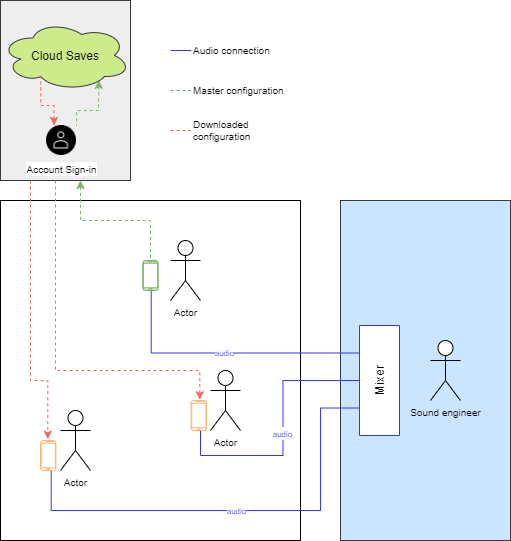
- Multiple launch positions on stage Multiple phones with Stage Player (shared configuration via cloud)
Whatever your choice, the most important factor is rehearsing with your setup before you perform with it. Technical reliability comes from familiarity.
Need a reliable phone-based solution?
Stage Player was built specifically for live performers who need a dependable, ad-free audio player that won't let them down on stage.
Discover Stage Player